



2026 Edition Professional 3D Printer Buyers Guide
Choosing the right 3D printer doesn't have to be difficult. Find the perfect printer for your application. This in-depth guide covers pricing, materials, dimensional accuracy, and more.
Download now Leading Tech Since 1997
 Dynamism Digital Manufacturing Fast and Professional on-demand 3D Printing Start Printing Now
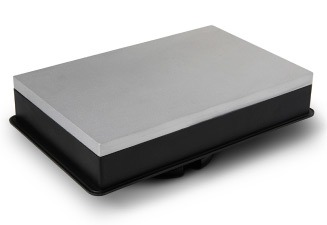
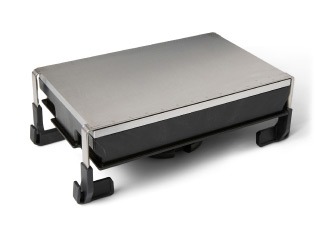
Form Studio 1 Build Platform Jig is a tool that holds your Form Studio 1 Build Platform or Build Platform Flex at an ergonomic angle at the edge of your workbench for easier part removal.


Shop with Confidence
Dynamism will match a competing offer on qualified items. Learn More
Founded in 1997, we bring next-generation technology to customers, with an emphasis on expertise and white-glove service. Showrooms in Chicago, Detroit, Tokyo, and Seoul.
The leading national supplier of Desktop 3D printers. Expertise in both Industrial and Desktop 3D printing. Supplier of next-generation Metal, SLS, ultrafast Industrial printers.
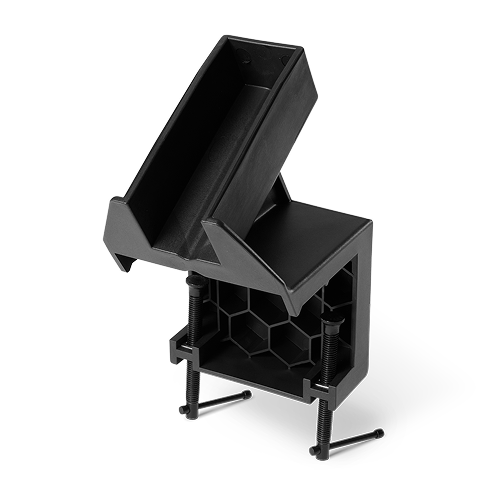
Form Studio 1 Build Platform Jig is a tool that holds your Form Studio 1 Build Platform or Build Platform Flex at an ergonomic angle at the edge of your workbench for easier part removal. By freeing up both hands, this productivity add-on improves safety, reduces strain, and streamlines your part removal step.
Yes, in three ways: cover it with the included camera cap (in the accessories box or print your own from the preloaded print jobs), turn it off in the printer settings (also shown during onboarding), or unplug the camera cable to disconnect it completely. The camera and time-lapse are separate settings, so you can turn off time-lapse while keeping the camera on.
No, Form Studio 1 is not compatible with the Resin Pumping System.
Form Studio 1 connects over Wi-Fi, on both 2.4 GHz and 5.0 GHz bands. There is also an ethernet option. To connect, go to the printer UI, then Settings, then Connectivity. The printer runs fully offline. Connecting to an account unlocks the full feature set, including remote print monitoring and the mobile app. Without a connection, update firmware through PreForm over a USB connection.
The Form Studio 1 Resin Tank uses a film engineered for Alpha Resins, which gives faster prints and a better finish on supported surfaces. Some materials, including Tough 1500 Resin V2 and most third-party resins, contain ingredients that damage this film, so they require the Form Studio 1 Resin Tank Pro. Never print these materials in the Form Studio 1 Resin Tank. The film can degrade quickly and leak resin, which can damage your printer and leave a mess to clean up.
Resin tanks are consumables, and their lifespan depends mainly on the number of layers printed and accumulated wear. With proper maintenance and Formlabs materials, Form Studio 1 resin tanks are designed to last more than 75,000 layers. The tank film can't be replaced on either the Form Studio 1 Resin Tank or the Resin Tank Pro.
Yes. After three days without a print, the UI displays a warning that directs you to stir the resin tank with the plastic scraper included in the accessories box.
Form Studio 1 uses a resin tank built with a film engineered for Alpha Resins, which removes the need for continuous mixing. The printer still mixes resin when it needs to, either to even out heating or to reduce settling after resin sits in the tank, by running a build platform mix routine that moves the build platform through the resin.
No. The latch that seats it into the Z-axis assembly is a different fit, so a Form Studio 1 build platform will not go into a Form 4, and a Form 4 build platform will not go into Form Studio 1. The smaller platform lets Form Studio 1 print taller parts (235 mm vs. 210 mm) in a smaller footprint.
A camera, a resin sensor, force sensors, a resin temperature sensor, and a build platform leveling sensor. These match Form 4, minus the mixer debris sensor, since Form Studio 1 has no mixer.
Like Form 4, the release texture is a passive mechanism with no moving parts that reduces the peel forces that cause most wear and reliability issues on LCD-style printers. Form Studio 1 refines the pattern outside the build area to improve airflow.
At launch, Form Studio 1 prints Alpha Grey, Alpha White, Alpha Black, and Alpha Clear at 100 and 50 µm; Alpha Model at 50 and 30 µm; Alpha Fast at 150 and 250 µm; Tough 1500 Resin V2 and Flexible 80A Resin V2 at 100 µm; and True Cast Resin at 50 and 30 µm.
Yes. On Form Studio 1, Open Material Mode ships included by default, with no purchase or activation step. (On Form 4 it is a paid license.)
True Cast on Form Studio 1 can print filigree pieces and has improved fine feature resolution and supported surface finish. Compared to the same part on Form 4, it prints with fewer supports and smaller touch tips.
One year of coverage on manufacturer defects, plus email support.
Accidental damage coverage and phone support on top of the warranty. Deductibles are $150 for a printer replacement and $50 for an LPU replacement.
XY dimensional tolerances are ±0.5% for 1–30 mm features, ±0.2% for 31–80 mm features, and ±0.03% for 81–150 mm features, with a lower limit of ±0.08 mm. A 35 µm pixel size and pre-tuned anti-aliasing deliver sharp detail, smooth surfaces, and parts that fit together as designed.
The Form Studio 1 supports six Alpha Resins developed specifically for it: Alpha Grey, Alpha White, Alpha Black, Alpha Clear, Alpha Fast, and Alpha Model. It also supports Tough 1500 Resin, Flexible 80A Resin, and True Cast Resin. Every supported material comes with validated print settings tested on the Form Studio 1, so you get reliable results without calibration or trial and error. Most other Formlabs resins are also compatible. These dispense automatically from the cartridge, but you'll need to tune your own settings and use the Form Studio 1 Resin Tank Pro. Print performance may be lower, and mechanical properties may differ from published values. You can also print third-party 405 nm resins using Open Material Mode. Automatic dispensing is disabled in this mode, so you'll pour resin manually and tune your own settings.
PreForm, Formlabs' free print preparation software, automatically orients models, generates supports, and slices your files, so you can optimize your layout and send jobs straight to the printer. Form Studio 1 is not compatible with third-party slicers or print preparation software.
Most prints finish in under 2 hours (based on the 80th percentile print height of 53 mm at 100 µm layer height), and print time stays the same whether you print one part or a full build platform. With Alpha Fast Resin, the Form Studio 1 prints at up to 130 mm/hr.
After printing, wash parts in IPA or Formlabs Resin Washing Solution to remove uncured resin, then UV-cure them to reach final mechanical properties. Form Studio Wash+Cure, or Form Wash and Form Cure, automate both steps.
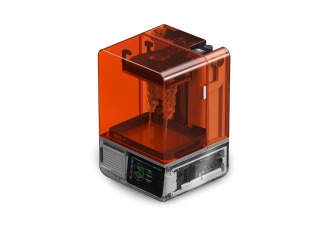
Form Studio 1 is sold by Formlabs and its authorized resellers. Dynamism is an authorized Formlabs reseller and sells Form Studio 1, Form Studio Wash+Cure, Alpha Resins, and Form Studio 1 accessories at dynamism.com.
Founded in 1997, we bring next-generation technology to customers, with an emphasis on expertise and white-glove service. Showrooms in Chicago, Detroit, Tokyo, and Seoul.
The leading national supplier of Desktop 3D printers. Expertise in both Industrial and Desktop 3D printing. Supplier of next-generation Metal, SLS, ultrafast Industrial printers.
2026 Edition Professional 3D Printer Buyers Guide
Choosing the right 3D printer doesn't have to be difficult. Find the perfect printer for your application. This in-depth guide covers pricing, materials, dimensional accuracy, and more.
Download now