
Loading Filament Into Ultimaker S3/S5
Determine
Before you can start printing on the Ultimaker S3/S5, you need to load materials into the printer. For the first use, it is recommended to use the spools of Tough PLA and PVA that come with the Ultimaker S3/S5.
Load Material 2
01
Place the spool with material 2 (PVA) onto the spool holder and select Confirm. Make sure the end of the material points in a clockwise direction, so that the material can enter feeder 2 from the bottom
02
Wait until the Ultimaker S5 detects the material and Confirm
03
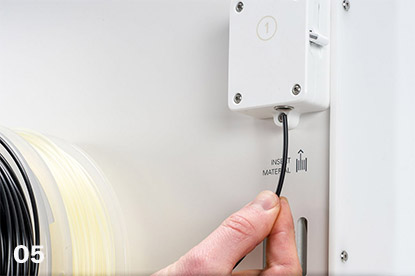
Insert the end of the material into feeder 2 and gently push it until the feeder grips it and the material is visible in the Bowden tube. Select Confirm to continue
04
Wait for the Ultimaker S5 to heat up print core 2 and load the material into the print head
05
Confirm when the new material extrudes consistently from print core 2
06
Wait a moment for print core 2 to cool down

Load Material 1
Material 1 will be put on the material guide first before placing it on the spool holder in order to avoid any tangling of the 2 materials during printing. Select material 1 from the list on the touchscreen, select Start, and follow the steps below.
01
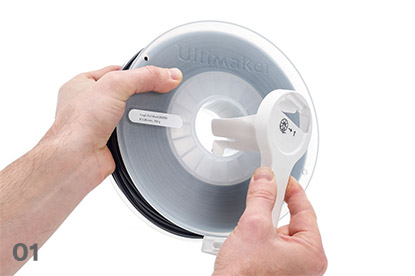
Take the material guide and hold it with the outer part towards you
02
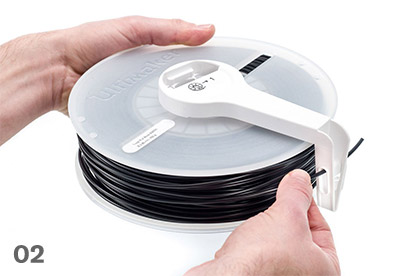
Place the material spool with material 1 (Tough PLA) on the material guide with the material in a counter-clockwise direction, and guide the end of the material through the hole in the material guide
03
Place the material guide with material 1 on it onto the spool holder behind material 2, and select Confirm
04
Wait until the Ultimaker S5 detects the material and select Confirm
05
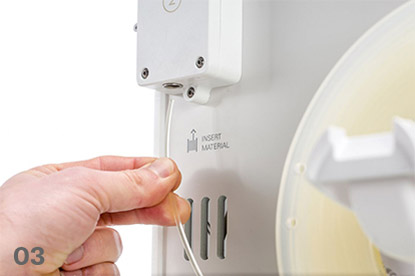
Insert the end of the material into feeder 1 and gently push it until the feeder grips it and the material is visible in the Bowden tube. Select Confirm to continue
06
Wait for the Ultimaker S5 to heat up print core 1 and to load the material into the print head
07
Confirm when the new material extrudes consistently from print core 1
08
Wait a moment for print core 1 to cool down