
Categories
Education Engineering

Incorporating 3D Printing into
Real- World Biomedical Engineering

Whether you’re a 3D printing aficionado or just getting started with this in the classroom, printing trinkets gets old quickly. When searching for your next project, why not take on something that flexes your creativity and benefits others?


3D Printing in the Real World

3D printing isn’t just something to create a spinning table top for a school project! Practitioners of Biomedical Engineering use this technology regularly. In fact, every time a prosthetic arm is prepared for a patient, customized work must be done to create the right fit. 

When a patient receives a prosthetic hand or limb it is usually ordered “off the shelf”. The new prosthetic must be fitted to ensure compatibility with the size and shape of the person’s arm, write, or remaining limb. Just like fingerprints, each person is slightly different in the shape and size of their amputation site. Additionally, some amputees have their full arm remaining while others have also lost their full forearm. 3D printing techniques allow prosthetists to create customized fits for every patient based on their needs.


The NeuroMaker Connection

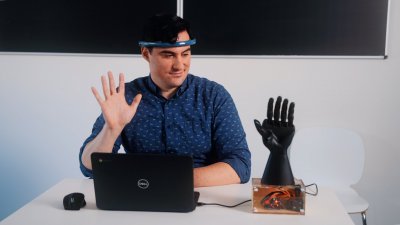
NeuroMaker’s materials and culminating experience, the NeuroMaker Challenge, provide students the opportunity to apply their knowledge of prosthetic and assistive devices to solving a real world problem. Students are encouraged to implement new technologies, including additive manufacturing.

Educational Use Case: King Kekaulike High School

Team Digit Prosthetic Band from King Kekaulike High School in Hawaii 3D printed out a specialized Biomedical attachment to a prosthetic finger. These specialized parts allow a person missing a finger to add one artificial finger from an artificial hand onto their wrist for better quality of life.

Educational Use Case: Central High School

Team Commodores of Perry Central High School in Indiana 3D printed out a specialized digit for their prosthetic hand which allows the placement of a piezo sensor. This sensor allows an amputee to detect how much pressure is being applied to an artificial finger. This group of students discovered applications for an amputee holding a baby and ensuring that not too much pressure is applied.


3D Printing Pieces to Investigate for Customized Prosthetics

Depending on how much adventure you’d like to take on, there are multiple ways to design custom pieces to real world prosthetic arm projects. Here are some quick ideas!

Custom Box to Hold Control Components

Learn how to create and print out the case which will hold the “brains” of your prosthetic by watching below.

In this video, step by step instructions are provided to build the control box attachment for the NeuroMaker Hand. Each action of the drafting process is here to follow along!

Once this item is drafted, this attachment will be placed on top of the Arm component of the NeuroMaker prosthetic. This will house all the electrical items needed to control your real prosthetic!

Arm Attachment

Learn how to create and print out a sample housing for your prosthetic to attach to a limb here by watching below.

In this video, step by step instructions are provided to build the grip attachment for the NeuroMaker Hand. Each action of the drafting process is here to follow along!

Once this item is drafted and printed, this attachment will be grasped by the wearer and will house the other pieces of the NeuroMaker prosthetic. This will be the main housing and grip attachment for your prosthetic arm!

Finger Pieces

Learn how to create and print customized finger pieces by watching below.

Base

In this video, step by step instructions are provided to build the finger base attachment for the NeuroMaker Hand. Each action of the drafting process is here to follow along!

Once this item is drafted, this attachment will be connected to the distal and proximal finger attachments. This piece will allow your fingers to connect together on your new prosthetic!

Proximal Finger Base

In this video, step by step instructions are provided to build the proximal finger attachments for the NeuroMaker Hand. Each action of the drafting process is here to follow along!

Once this item is drafted and printed, this attachment will be modified to attach to the provided NeuroMaker Hand finger digits. These digit attachments will provide better control and grip functions for your prosthetic!

Distal Finger Attachment

In this video, step by step instructions are provided to build the distal finger attachments for the NeuroMaker Hand. Each action of the drafting process is here to follow along!

Once this item is drafted and printed, these finger modifications will be attached to the NeuroMaker Hand finger pieces. These adjustments will work with the proximal finger attachments to provide greater control and functions of your prosthetic hand!

Mid Finger Linkage

In this video, step by step instructions are provided to build the finger linkage pieces for the NeuroMaker Hand. Each action of the drafting process is here to follow along!

Once this item is drafted, this attachment will be connected to the finger attachments of your NeuroMaker Hand to provide stability. This piece will allow your fingers to connect together on your new prosthetic!
Categories
3D Printing Automotive

How one 3D scanning company is elevating the Automotive Industry

If you’ve ever been working closely on a manufacturing production line, you know how much time it can take to research and implement the perfect part. A company that understands that problem very intimately is Shining 3D


What is Shining 3D?

Shining 3D is one of the industries most innovative companies in the 3D printing industry that provides its users with technology that makes your production smooth and seamless. The company knows that there are a multitude of user-bases that have specific needs, so they are designed to work for all purposes.

Their scanners allow users to better inspect objects for a more detailed breakdown, and encourage them to completely reverse engineer objects for future use.


How do I pick the right scanner?

Choosing the right 3D scanner can be complicated, especially if you have no experience with the technology. So, take a look at our extensive handheld scanner guide to gain some key insight onto what scanners might work for you. 


User Cases

The best way to tell if a product actually works is to see how it performs in action. So, take a look at some automotive user case studies from Shining 3D customers.

Emergency Vehicles from System Strobel

When the people you transport in your vehicles are in the midst of a medical emergency, you want to make sure that it’s ready for anything that might happen. With that ideology in mind, System Strobel, a commercial vehicle manufacturer specializing in ambulance, patient transport and emergency vehicles, makes it happen.

Using the power of the Einscan HX, the company was able to capture a high resolution 3D scan of an Audi A6’s trunk. This helped them to completely customize the rear of the vehicle to store crucial medical equipment in a safe and secure environment.

Custom Printed Motorcycle from Fuller Auto

Have you ever been so frustrated by your current vehicle that you decide to take matters into your own hands? Well, Bryan Fuller of Fuller Auto did exactly that

Using an EinScan Pro 2X Plus Multifunctional Handheld 3D Scanner, he was able to add some key after-market parts like a PWR Radiator to fully customize his riding experience. Instead of using the old-school conventional ways of measuring and designing, the Einscan allows users to get the best results and provide the most accurate and efficient experience.

How? By utilizing a three step process that emphasizes data acquisition, their point cloud system, and their final meshing technology. 

Categories
3D Printing Automotive

Which Car Brands Use 3D Printing?

From prototypes and parts, to producing best-sellers in the automotive industry, 3D printing has enabled cars to truly evolve for the better. No longer is the 3D printer considered a piece of niche technology, but it has resulted in major success for a litany of car brands.

Which car brands have added value, cut costs, or even expedited their manufacturing processes with 3D printing? Take a look at just some of them below!


Ford

As the company that introduced the world to the car and the assembly line, it’s only right that Ford is still at the forefront of pushing the boundaries of technology. For years, Ford has utilized what 3D printing has to offer, especially in their manufacturing process.

Even more exciting, though, is that Ford is embracing change by offering its customers the ability to modify their vehicles post-purchase with 3D printed add-ons. More specifically, Ford’s Maverick Pickup is letting users be creative with the FITS system; “a series of slots at the rear of the center console and the under-seat storage bins designed to use with accessories.” 

Interested in specific Case Studies from our trusted 3D Printer Makers? Take a look at one from Ultimaker, Desktop Metal, and BigRep.


Toyota

The Toyota Corolla is known for its dependability and reliability. Consequently, the Japanese automotive giants turned to 3D printers to get their cars to market sooner. 

Ricoh 3D, a 3D printing industry service provider, enlisted their workshop to print and manufacture prototypes for Toyota.

Why? So they could get a better idea on how parts would print, react to conditions, and overall impact their final product. 


Volkswagen

What do you get when you mix Germany’s top automotive and automation companies? A perfect marriage of innovation and an increase of production. Both Volkswagen and Siemens have teamed up to implement adhesive in their binder jetting process.

Adoption of this world-class technology is propelling them to move forward and actually make this form of production suitable for many years to come. This is hardly a surprise to those that have taken notice of Volkswagen’s process the past few years.

Why? Many of our 3D maker partners have worked closely with the German giant as of late, specifically Ultimaker in their 2017 Case Study.


Chevrolet

When you think of Chevrolet, what do you think of? The Corvette? The Camaro? The Chevy Silverado? Well, we do too. Not just because they are industry staples, but because those models effectively use the power of 3D printing.

The Racing Team at Chevy, employing 3D printing technology, have equipped their race cars , specifically the Corvette C8.R, INDYCAR, Silverado race truck and NASCAR Camaro, with 3D printed parts.

This has successfully allowed themselves to not only support over 80,000 miles of production, but to take home a whole trophy case worth of awards in the process. Suffice it to say, 3D printing has done its job, and then some.


Kia

Debuting as a concept car in 2016 and finally hitting the market in 2019, the Kia Telluride was able to first be envisioned through 3D printing. In a 2016 press release, the company announced a new model, and was able to display their concept at the 2016 North American International Auto Show.

Their final model features a “steering wheel, dash, and even door panels” that were produced with 3D printing technology.

This may not seem like that big of a deal to some, but their implementation of cutting-edge technology has proved to be very successful for the Telluride, propelling the model to be a best-seller in the United States.


Hyundai

In an effort to embrace new technologies that advance the market-share of electric vehicles and to help combat climate change, Hyundai has established a key relationship with Nanyang Technological University, Singapore to further delve into the true potential of 3D printing. 

They aim to do this by establishing top-notch production facilities dedicated to improving their additive manufacturing and giving customers some truly unique options. With customization in mind, Hyundai believes that they will be able to offer their cars to customers on a more personal level, adding specifically tailored functionality.

Additionally, 3D printing is pushing them to cut their time spent on the design cycle drastically. This enables them to reap the reward of huge cost savings which can be reinvested into the company’s daily operations.


Fiat Chrysler

It’s no secret that companies embracing 3D printers are often looking to improve their manufacturing efforts. Unsurprisingly, that’s exactly what Fiat Chrysler is aiming to do.

The Fraunhofer Research Institution for Additive Manufacturing Technologies’ (IAPT) research team along with engineers from Fiat Chrysler teamed up to embrace innovation through 3D printing, creating “a 3D printed suspension part for one of its sports cars.”

Even more exciting is that the Italian-American corporation features high-powdered and prestigious brands like Maserati, Lancia, and Alfa Romeo. We’re certainly excited to see where the brand evolves with their increasingly robust use of 3D printing.


BMW

We don’t know about you, but when we think of a luxurious, modern, and sleek car that’s just begging to be driven, we think of the BMW i8 Roadster. BMW, a leading pioneer in the automotive industry, has constantly been at the forefront of car production.

For over 28 years, the company has been researching and perfecting the use of additive manufacturing. This has not only enabled them to make better looking vehicles, but they have had exceptional measurable results which have produced parts that are lighter and sturdier. 

As time progresses, we anticipate BMW to continue leading the way on utilizing 3D printing in the automotive industry, whether it’s in their most premiere models, or along the assembly line.


Audi

When Audi needed a quick solution to replacing and implementing parts in the assembly process, they looked to their team of engineers, who, in turn, looked to their collection of 3D printers.

The printers in their Audi R8 factory in the Böllinger Höfe allow them to custom build parts on a case-by-case basis, and give their engineers immediate feedback on how they will fit and work in their vehicles.

Using CAD technology, they were able to print crucial parts that place key sensors in their vehicles. This has made their production process incredibly seamless and helps to build faster and better.


Aston Martin

When you stumble upon a bump in the road, you better have some confidence in your suspension. In order to increase their performance, British Luxury Sports Car Icon Aston Martin turned to the team at Domin to embrace 3D printing “for the development of a “world-leading” suspension system.”

Aston Martin’s end goal is to achieve implementation of their 3D printed suspension system in their final products through rigorous testing and prototyping in the production process.

From the outside looking in, we have the utmost confidence that the car brand will have success in this venture, considering this is far from the first time they have deployed additive manufacturing. 


Lamborghini

When the Italian supercar brand takes on a new technology to produce some of the most stunning vehicles the world has to offer, you should take notice. Their Sián Coupé and Roadster feature modern design through the capabilities of 3D printing, namely in their air ventilation system.

Although they are using the technology in relatively small capacities, we anticipate that they, and other luxury brands, will continue to adopt it in the future. Why? Because additive manufacturing is continually growing and proving its worth among others.


What works for me?

In our experience, all of our customers all come from unique backgrounds. Some printers don’t offer the capabilities that fit your needs quite like you need them to. Do you have any questions about our selection of products, potential savings opportunities, or anything in between? Fill out the contact form below and we will be in touch shortly!

Categories
Telepresence Robot

SK’s Innovative Vision for Global Carbon Reduction

A Double 3 Telepresence Robot Use-Case

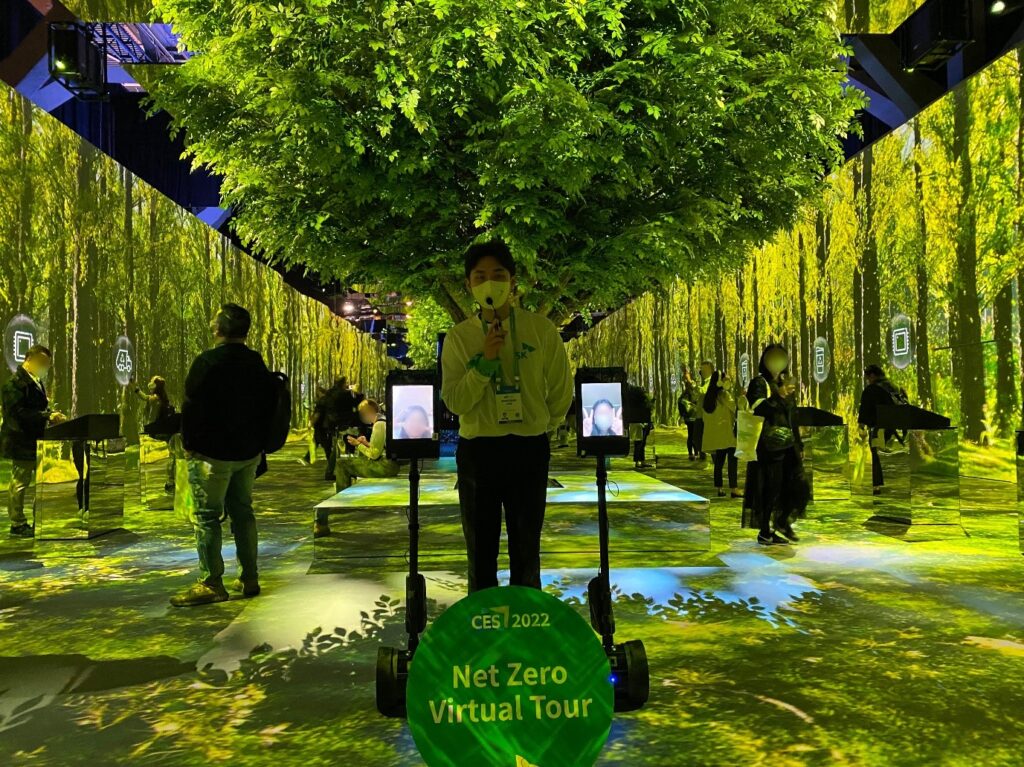
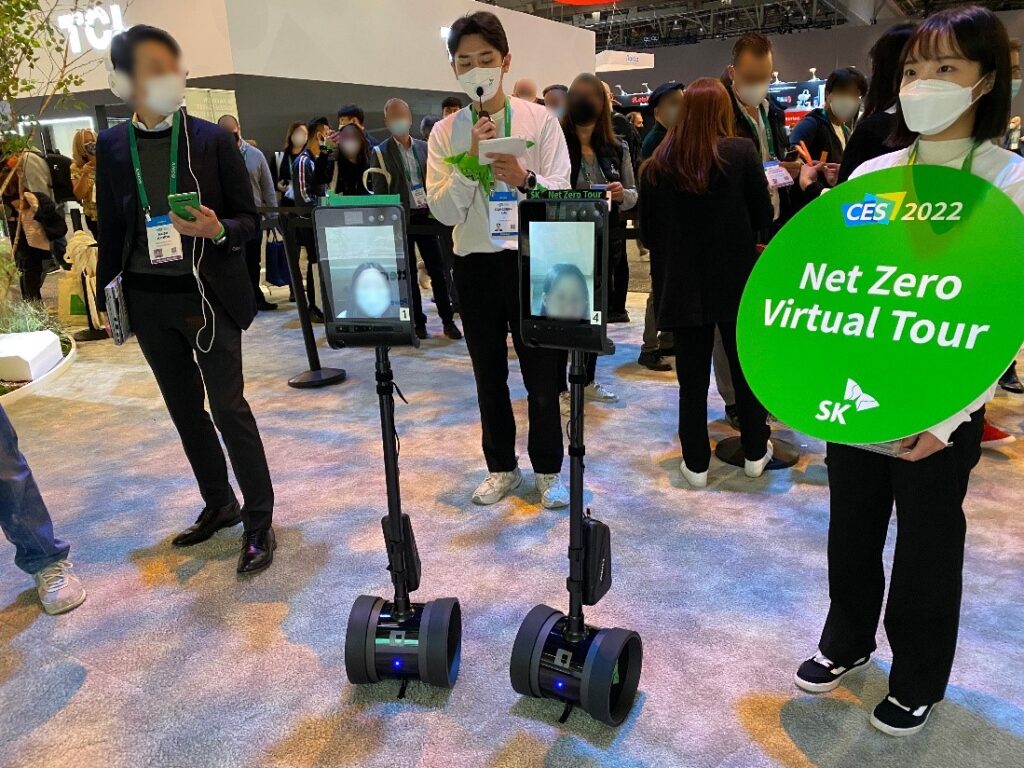
At this year’s CES, the world’s largest ICT and home appliance exhibition, SK announced its strong commitment to eco-friendly innovation to reduce their global carbon output. In an effort to give virtual attendees a first-hand look at their efforts, SK utilized Double Robotics’ Double 3 in their Green Forest Pavilion exhibit. Users were able to feel the lush vividness of their display from a completely remote setting.

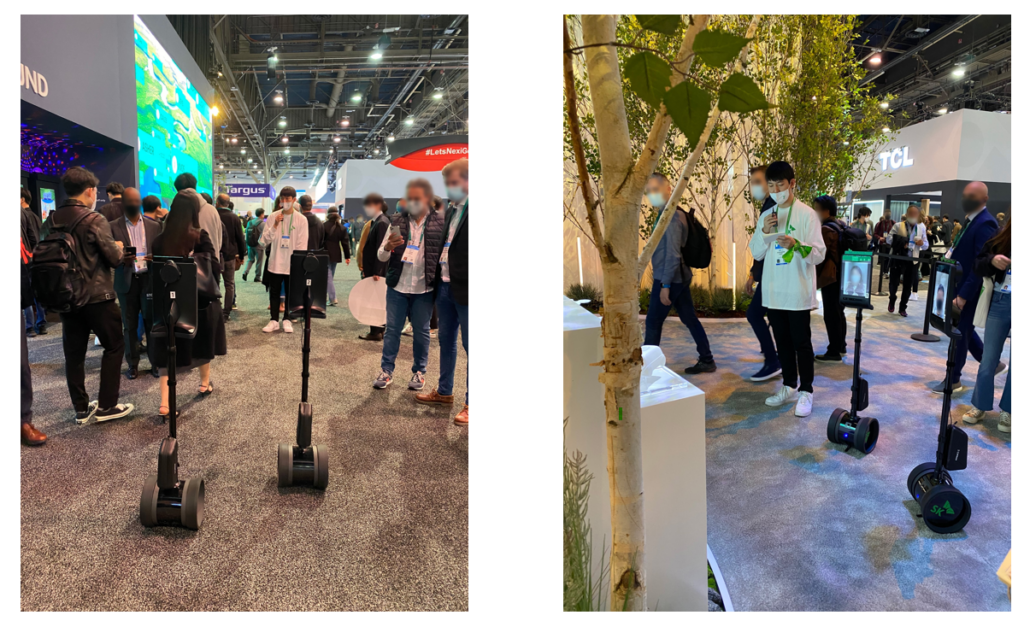
Through the SK’s Net Zero Virtual Tour, visitors connected to the Double 3 and traveled across the SK’s Green Forest Pavilion getting a real-time view of the action. Even more impressive, users took advantage of on-site guidance where they could ask staff questions directly via the Double 3’s A/V system.

Double 3 is an autonomous video conferencing robot designed for indoor use that changes the way you can work or learn remotely that was developed to quickly overcome difficulties caused by situations that called for remote technology. The robot is easy to control, and is done so by simply clicking to move to a desired location. 

With safety in mind, it is designed to stop when the robot encounters unexpected situations thanks to a built-in 3D sensor. Additionally, the robot can make detours around obstacles on the way to your destination, ensuring that it always arrives unscathed. The obstacle avoidance feature makes it especially easy for beginners who are not familiar with the technology. 

From a technological standpoint, Double 3 has two built-in 13-megapixel cameras, providing a very wide field of view and multiple levels of zoom function that is very useful for reading documents or any other specific information you might need to see. Furthermore, six microphones and integrated audio systems help to achieve greater innovation by enabling better means of communication with people on site.

As you can see, Double 3 is increasingly suitable for the non-contact era as it can be leveraged anywhere and everywhere that requires remote controls like schools, workplaces, hospitals, and museums.

Categories
3D Printing Education

The Benefits of 3D Printing in the Classroom

Year after year, schools and their teachers search for the best educational techniques to bring excitement and learning to the classroom. You will achieve both goals with the hands-on learning experience of 3D printing. 

Students benefit in many ways with the introduction of 3D printing to their curriculum. How?

Textbook based readings and standard homework assignments have always been a long-term strategy for learning. But, the on-screen to real-world nature of 3D printing truly sparks the engagement and creativity of students. 

At least as far as Onfim in the 13th Century, students have strived to be creative in the classroom, either through their assigned homework and projects, or simply by doodling at their desk. 

Bringing in the engaging technology of 3D printing allows students to exercise their creativity. Designing on their own and seeing it come to life can nurture that inherent creative spirit and push them to continue that mindset.

Studies have shown a high correlation between classroom 3D printing use and academic achievement. 

A 2018 study found that students that worked with 3D printing were able to more quickly and decisively answer questions on medical examinations, which was correlated with higher test scores.

Spatial Learning and its benefits are widely accepted. Utilizing the advanced technology of 3D printing is an excellent way to practice this learning technique. It helps to engage with your students and increases their capacity to better understand their surroundings. 

3D printing benefits students in the short-term, and it helps ensure that they will be able to retain those skills as they grow older.

Students that interact and actively use 3D printing technology gain valuable technological skills, but they will also derive other measurable  benefits. By actively using new technology like 3D printers in group projects and presentations, students will increase social and communication skills.

A study, conducted at Texas A&M University, echoed that sentiment, stating that working with and designing for 3D printing projects has “a positive influence on student’s motivation, interests, mathematic skills, and real-life skills.” 

As STEAM learning becomes more adopted, 3D printers have raced to the forefront of education. This approach has shown benefits in multiple ways, namely through the crucial impact it has had on girls.

An initiative demonstrating this remarkable impact is MakerGirl from the University of Illinois at Urbana-Champaign. This program has shown great efficacy by providing workshops and educational material to girls age 7 and up.

When you take a look back at the technological advancements of the past century, it is truly incredible how much innovation has occurred. It is not essential for students to have access to 3D printers.

For an entire nation, its workers, and its students, having access to leading technology bestows a “first-mover” advantage that lasts for decades. Implementing 3D printing in your school can help to provide that critical experience, giving your students true opportunity in the economy of the 2020s.

How do I get started?

To kick off 2022, Dynamism created a brand-new EDU Purchasing Guide for our Nation’s educators to get a better idea of which items might help their classroom. Take a look at our guide by filling out the form below!

Image
Categories
3D Printing Education

Why 3D Printers are Right for Your Classroom

We’re often asked if the kit-like 3D printers, usually marketed as a cool toy for consumers, and costing less than professional 3D printers, would be sufficient for a classroom. While these printers are okay for occasional printing in your garage, they don’t stand up to the rigor of daily use (whether by kids or adults), nor do they produce reliable and repeatable results.

Why Professional-Grade 3D Printers Save Money in the Long-Term

Investing in 3D printers designed for education will provide you the best long term return on investment, and reliably produce the best educational outcomes. The cheaper consumer-focused 3D printer is enticing, but they are typically only used for a few months before most realize they need a more robust tool.

Dynamism only sells professional-grade printers that will endure daily use, are easy to maintain, and generally modular–so if repairs are needed the vast majority are simple part swaps. Our printers are designed and manufactured for the heavy, everyday use in the educational 3D printer lab, classroom, factory floor, or engineer’s daily use.  These are a larger upfront investment than consumer-focused printers, but a lower cost of long-term ownership, and immeasurably better ownership experience due to their reliability and accuracy. 

Dynamism Makes 3D Printing Affordable for Education

In many cases we, working with our maker partners, can offer special Educator-only pricing. Fill out the form below to view your savings.

What Works for Schools

3D printing in education comes in three easy pieces: 3D printers, the consumable that is used for printing (filament or resin), and software.

There are many options when it comes to top tier 3D printers for school, but we have some top recommendations. For schools with the most budget flexibility, we recommend Ultimaker. Headquartered in the Netherlands, Ultimaker produces a beautiful quality and well manufactured 3D printer that is sophisticated, yet easy to use. They are simple to set up and run reliably.

As with any mechanical tool, occasional maintenance is needed. Ultimaker’s design makes this easy. And, our Warranty Plans can protect you against any unexpected cost for years to come.

Which Ultimaker 3D printers does Dynamism offer?

Ultimaker S5

Ultimaker’s best-seller is the Ultimaker S5. This printer also features Ultimaker’s largest potential print volume.

Be sure to check out the Ultimaker S5 Pro Bundle, which includes air manager (with filtration), material station (for easy changing of filament colors or types), and all the necessary software to get your curriculum running.

Ultimaker S3

Ultimaker S3 is very similar to the Ultimaker S5, but with a smaller potential printing area.  It also uses less space on a tabletop. So, if space is a concern, or if you want more printers in a given budget, the Ultimaker S3 is an excellent option.

Ultimaker 2+ Connect

Out of the box, the Ultimaker 2+ Connect may be our most easy printer to start working with. The biggest difference between the 2+ and the S5/S3 is that it is a single extraction printer. This means that your prints will only be made with one filament type and may be less complex, but that can be a benefit depending on your classroom’s needs.

If you’d like even more functionality, we offer the Ultimaker 2+ Connect Air Manager Bundle which will help to filtrate your printing process.

Resin or Filament is the substance that your 3D printer uses to create an object. There are many 3D printing materials available, but if you would like to go with an Ultimaker 3D printer, we recommend Dynamism filament, or Ultimaker filament.

A Useful Filament Tool

An optional add-on for the Ultimaker S5 is the ever-so-useful Material Station. This add-on helps to ensure that your filament is stored in optimal humidity, automatically changes spools when necessary, and is included in the S5 Pro Bundle. Simply put, it’s an elegant solution.

Software can truly enhance your 3D printing experience. Some key programs cut down on time spent printing and materials used for your Software is a critical aspect of the 3D printing experience. Good software will configure your printer to achieve goals faster, and with less use of materials.

Which Software is compatible with Ultimakers, and how does it save money?

A lot of our Ultimaker bundles come with top of the line 3D printing software. Some bundles feature Ultimaker Essentials/Personal Software, but other Ultimaker printers give you eligibility for huge discounts on SmartSlice for Ultimaker Cura.

Ultimaker Cura

Ultimaker Cura is the world’s most popular 3D printing software. As a simple to use slicing software, Cura integrates smoothly with any workflow through their Marketplace plugins. With the needs of both beginners and engineers, Cura will make the most of your Ultimaker with a more speedy and reliable printing process.

SmartSlice

SmartSlice is a state of the art software designed for Ultimaker Cura that helps you optimize prints efficiently. By improving build instructions to the 3D printer, SmartSlice helps to cut down on the amount of time you spend printing and the amount of filament you use during your print, resulting in time and cost savings.

The Final Verdict

As you can see, there are many ways to gain efficiency with professional 3D printers. Although they are more expensive up front, they will save on overhead costs and give you back some much needed time for other tasks. Additionally, there are a plethora of materials, parts, and 3D printing software to limit waste and get more out of a given budget.

Whether you’re ready to start now, or you still have questions, check out our catalog of printers, materials, parts, and other useful tools. Or, if you want a more personal touch, reach out directly to one of our Product Experts at 1-800-711-6277 or sales@dynamism.com.

Exclusive Discounts & Detailed Recommendations

To kick off 2022, Dynamism created a brand-new EDU Purchasing Guide for our Nation’s educators to get a better idea of which items might help their classroom. Take a look at our guide by filling out the form below!

Image
Categories
3D Printing Education

What to know before 3D printing in the classroom

3D printing has exploded in importance in recent years, and now schools are starting to embrace the revolutionary technology. Still, 3D printing can remain a challenging technology to embrace for those without previous experience.

So, let our team at Dynamism walk you through the process, and we’ll start with answering some of the most common questions from educators.

What do I need to get started?

There are some key pieces of information that you need to know before you can start printing in your classroom. Take a look at our checklist below!

✅ 3D Printer

First is choosing the right 3D printer. Choosing the right 3D printer will have the largest impact on the rest of your experience. We can offer expert, unbiased, and detailed advice. As a start, we have a few recommendations below.

Which 3D printer will benefit my classroom?

Deciding which 3D printers to bring to your classroom can be confusing. Here are some tips from our extensive experience working with educators.

Grades K-6

For classrooms filled with eager kids, having printing bandwidth, easy accessible storage, and detailed plans to jump-start your learning are your keys to running a successful program. See which of our options is for you with our recommendations below.

Image

Looking to get started with a fast and simple-to-use 3D Printer that comes with numerous bells and whistles? Our MakerBot Sketch Classroom Bundle comes with two printers, an abundance of extra filament, and over 600 educational lesson plans to keep you covered through your entire school year and beyond. Order this bundle to get a great plug-and-play, straight out of the box, experience.

Image

Another excellent option for the classroom is our Dremel DigiLab 3D45 Education Package. It includes the Dremel DigiLab 3D45 printer, along with extra filament, 30 lesson plans for hands-on experience, and the opportunity to acquire 4 hours of Online Professional Development Credit through ISTE. To learn how to earn your 4 hours, please visit Dremel’s ISTE Certified PD Certificate Access Walkthrough.

Grades 7-12

For classrooms with students looking to expand their knowledge and get a little more serious with 3D Printing capabilities, here are excellent options.

Image

If you’re ready to bring 3D printing technology used by thousands of professional engineers to your classroom, try multi-color dual-head extrusion with the Ultimaker S5. Here, students get hands-on and real-world experience creating industrial-quality parts using Fused Filament Fabrication (FFF) printing.

Additionally, our bundle provides you with a seamless printing experience, with the inclusion of the Air Manager, Material Station, and professional grade software.

Generally, the Ultimaker Series is an excellent option for new and experienced users alike. Take a look at our catalog of Ultimakers to see what might fit your needs.

Image

Many of our Dynamism printer packages come with useful tools, and the Formlabs Form 3+ Complete Package is no exception. The Resin Tank, Build Platform, Finish Kit, and other add-ons will provide you with extraordinary value to get the most out of your printer. To view our complete selection of Formlabs printers, please click here.

Do you have some more questions?

If you aren’t quite sure what products would be best for your classroom, please check out our buying guide for teachers, reach out to one of our product experts by phone at 1-800-711-6277, email us at sales@dynamism.com, or simply enter your information below and we will get back to you shortly.

✅ Filament & Resin

Think of filament or resin as analogous to ink in traditional printers. When printing, you’ll need the physical component that is transformed into your model. Generally speaking, filament arrives as a long thread on a spool, while resin is a liquid hardened in the 3D printing process.

Printer brands that use filament include MakerBot and Ultimaker, and printer brands that use resin include Formlabs and Nexa3D.

✅ Software

Having the right software for your 3D printer makes operating it so much easier. We recommend utilizing PrintLab’s Classroom Software. PrintLab’s software can serve the entire classroom or just the teacher. This software gives you everything needed to get your lesson plan rolling. 

In short, PrintLab Classroom provides you with top-of-the-line teacher training, lesson plans, and certifications.

✅ 3D Scanner (Optional)

3D scanners are not a classroom necessity, but they’re a remarkable luxury. 

Using pinpoint laser technology, these scanners create truly remarkable 3D models of real-world objects. Scan any object you want to use in your project, and print it straight away. To view our handheld 3D scanner guide, please click here.

What if I need Technical Support?

Whether you’re a beginner or a veteran, 3D printing can be challenging. At Dynamism, we pride ourselves on providing you with unparalleled, unlimited, and always free support by toll-free phone, email, or chat.

In addition to unlimited free support, we also offer paid support options that include setup and training by videoconference or on-site, at your location. You can book a session with an expert from our staff to walk you through your product set up, and can even provide step-by-step instructions in real-time on any complications that you may be experiencing. 

Where do I find things to print?

You can either design your own files to print, or you can utilize online communities to download designs. If you’re looking for creative projects to print, check out some of these links:

  • Thingiverse by MakerBot: As an open and completely free community, Thingiverse is a blessing to enthusiasts and professionals alike. You can search for specific builds, or sort by most popular prints if you just want inspiration.
  • YouMagine: YouMagine is an accumulation of designs, blogs, and collections that can keep you and your entire classroom busy for years. We especially like incredibly unique collections page!
  • 3DShook: Although it’s not free, it is a very low cost way to purchase designs and packages of files. 3DShook is an excellent option for educators. 
  • Pinshape: Pinshape combines both free and paid designs of 3D printing enthusiasts from around the world. Download print projects, comb through their online forum or take part in one of their many 3D printing contests. Additionally, you can take a look at projects, tutorials, and pre-designed lesson plans.
  • Instructables: As an online platform set to inspire creative designs, Instructables can keep you and your classroom occupied for the entire year. Instructables has a dedicated page just for teachers, including featured projects broken down by subject and grade level.

Exclusive Discounts & Detailed Recommendations

To kick off 2022, Dynamism created a brand-new EDU Purchasing Guide for our Nation’s educators to get a better idea of which items might help their classroom. Take a look at our guide by filling out the form below!

Image