
Categories
Aerospace Defense Manufacturing

How Airbus Uses 3D Printing for Tools, Jigs, and Lightweight Parts

Aerospace production doesn’t leave much room for error. Every jig, fixture, and tool on the floor has to meet the same standard as the parts it helps produce. Traditionally, that has meant slow, expensive tooling cycles through outside machine shops. Airbus, however, took a different approach: bringing 3D printed jigs and fixtures in-house.

Key Takeaways

  • Airbus uses UltiMaker 3D printers and Cura software to produce tools, jigs, and fixtures at its European manufacturing facilities.
  • It also prints lightweight design parts from composite materials.
  • Printed tooling delivers part-to-part consistency, lower weight, and same-day design iteration.
  • The same pattern applies across aerospace and defense: jigs, fixtures, inspection gauges, and assembly aids made on-site.
Aerospace technician servicing an aircraft engine

What Is Airbus Using 3D Printing For?

Airbus uses UltiMaker 3D printers and Cura software to locally produce tools, jigs, and fixtures at its European manufacturing facilities, along with lightweight design parts made from composite materials. As a result, engineers don’t route every tooling need through traditional manufacturing. Instead, they design, print, and deploy what they need directly on the floor.

Why 3D Printed Jigs and Fixtures Fit Aerospace Manufacturing

A few things make this approach a particularly strong fit for aerospace production environments:

  • Consistency and repeatability. Jigs, fixtures, and tooling used in aerospace production need to produce the same result every time. Printed tools offer that consistency without the lead time of machining a new one from scratch.
  • Weight matters everywhere in aerospace. Composite materials let engineers produce lightweight parts that hold up to production demands without adding mass. In most other sectors, that consideration doesn’t carry the same weight (literally).
  • In-house iteration speed. When a jig needs a design tweak, an added handle, or a modified fit, the change can go from CAD to printed part the same day. In contrast, an external vendor’s queue can take weeks.

3D Printed Jigs and Fixtures Across Aerospace and Defense

Engineers designing 3D printed jigs and fixtures in UltiMaker Cura

This isn’t unique to Airbus. In fact, across aerospace and defense manufacturing, the same tooling categories keep showing up: custom jigs and fixtures, inspection gauges, assembly aids, and on-demand replacement tooling. All of them can be made on-site. Moreover, each one can be improved the moment feedback from the floor identifies a problem. Similarly, defense maintenance teams follow the same model; see how defense teams are using 3D printing in the field.

Where Dynamism Fits

As an authorized reseller, Dynamism helps aerospace and defense manufacturers identify the right printer and materials for production-floor tooling, from the S-series platform used in examples like this to the higher-throughput Factor line for continuous production. For programs with data-security requirements, the UltiMaker Secure line adds air-gapped, USB-only operation.

Related reading: What NIST 800-171 means for your 3D printing setup | How UltiMaker 3D printers reached Navy and Marine bases

Curious what this could look like on your floor? Explore the UltiMaker Secure line → | Talk to a specialist →

Frequently Asked Questions

What is Airbus using 3D printing for?

Airbus uses UltiMaker 3D printers and Cura software to locally produce tools, jigs, and fixtures, along with lightweight composite parts, at its European manufacturing facilities.

Why are jigs and fixtures a common 3D printing application in aerospace manufacturing?

They require part-to-part consistency and often need frequent design iteration, both of which 3D printing supports without the lead time of external machining.

Can 3D printed parts meet aerospace material and weight requirements?

Composite materials used in aerospace-grade 3D printing are selected to balance strength with reduced weight, an important factor given how directly weight affects aerospace production and performance.

What printer types are used for aerospace production tooling?

Applications range from desktop-class systems like the UltiMaker S-series for smaller jigs and fixtures to higher-throughput industrial platforms like the Factor line for continuous production environments.


Source: UltiMaker, “3D Printing Solutions for Military and Defense Applications” whitepaper.

Categories
Defense Manufacturing

What NIST 800-171 Means for Your Shop Floor’s 3D Printing Setup

If your facility handles Controlled Unclassified Information (CUI), NIST 800-171 covers more than servers and laptops. In fact, NIST 800-171 applies to the 3D printer on your production floor, along with every other networked device in your environment.

It’s an easy thing to overlook. A printer making jigs and fixtures doesn’t feel like the same category of risk as a workstation handling engineering data. But if that printer connects to your network, logs to the cloud, or moves files in ways you can’t fully account for, it’s a device your compliance program needs to cover, whether or not anyone has thought to ask about it yet.

Key Takeaways

  • NIST 800-171 applies to any networked 3D printer in an environment that handles CUI.
  • Compliance requires documented controls: network isolation, no unauthorized data transmission, and auditable file handling.
  • Air-gapped (USB-only) printers remove the network as an exposure path; LAN-only may not satisfy stricter frameworks.
  • Getting it right also unlocks on-demand, same-day tooling from a validated digital catalog.
Operator loading a part into an UltiMaker 3D printer on a regulated shop floor

Does NIST 800-171 Apply to a 3D Printer?

Yes, if the printer is a networked device operating in an environment that handles CUI. NIST 800-171 requires documented controls on networked devices: not vague assurances, but specifics your compliance program can point to. For a NIST 800-171 3D printer setup, that typically comes down to a few concrete things:

  • Network isolation. Does the printer need to be on your network at all, or can it operate air-gapped, with files moving only by USB?
  • No unauthorized data transmission. If a printer phones home for firmware updates, usage telemetry, or cloud-based slicing, that’s a data path someone has to account for.
  • Auditable file handling. Can you show, if asked, exactly how a design file moved from CAD to printed part, and confirm it didn’t touch anything outside your controlled environment along the way?

Why Manufacturing Tools Fly Under the Compliance Radar

It’s worth being precise about what’s being discussed here. These aren’t the machined molds used to churn out thousands of injection-molded parts. They’re the specialized devices that make technicians and engineers more effective: custom jigs, fixtures, inspection gauges, and organizers built for a specific line, part, or fix.

That specificity is exactly why they tend to escape compliance reviews. They look more like shop tools than IT assets, even though, functionally, a networked printer is a networked device either way.

The Case for On-Demand Tooling Under a Compliance Regime

Engineers designing 3D printed jigs and fixtures in UltiMaker Cura

There’s an operational upside to getting this right beyond passing an audit. Facilities that maintain a digital catalog of 3D-printable tools and parts can produce validated components on demand instead of maintaining physical inventory, and when a jig needs a design revision, that change can be tested and reprinted the same day.

The tradeoff is that every one of those advantages depends on the printer being something your security program can actually document and control, not a gap you’re hoping nobody asks about.

Where Dynamism Fits

As an authorized reseller, Dynamism helps regulated manufacturers evaluate which printer setup (air-gapped, LAN-only, or standard) actually matches what their compliance program requires, rather than guessing after the fact. The UltiMaker S8 Secure is built for air-gapped, USB-only operation with no Wi-Fi or cameras.

Related reading: How Airbus uses 3D printing for tools, jigs, and fixtures | How UltiMaker 3D printers reached Navy and Marine bases | Why data security matters for healthcare 3D printing

Not sure what your environment needs? Explore the UltiMaker Secure line → | Talk to a specialist →

Frequently Asked Questions

Does NIST 800-171 apply to 3D printers?

Yes, if the printer is a networked device operating within an environment that handles Controlled Unclassified Information (CUI). NIST 800-171 requires documented security controls on all networked devices, not just traditional IT equipment.

What makes a 3D printer setup compliant with NIST 800-171 requirements?

Key factors include network isolation or air-gapped, USB-only operation; no unauthorized data transmission such as cloud logging or telemetry; and auditable file handling that can be documented for a compliance review.

Is a standard, cloud-connected 3D printer a compliance risk in a regulated facility?

It can be, if the facility handles CUI or similar controlled data. A printer that transmits usage data, connects to a manufacturer’s cloud, or accepts jobs without access controls introduces a data path that must be accounted for like any other networked device.

What’s the difference between air-gapped and LAN-only printing for compliance?

Air-gapped means the printer has no networking hardware capable of reaching an external network, so files move only by USB. LAN-only means the device still has network hardware but is configured to stay off the internet, which may not satisfy stricter compliance requirements depending on the framework.


Source: UltiMaker, “3D Printing Solutions for Military and Defense Applications” whitepaper.

Categories
3D Printing Engineering Manufacturing

Bridging Fundamental Materials Research and Industrial Production

Categories
3D Printing Manufacturing

How REMET Stopped Depending on Commercial Metal Powder Suppliers

Categories
3D Printing Manufacturing

Solving Iron Casting’s Corrosion Problem Without Expensive Alloys

Categories
3D Printing Engineering Manufacturing

Hybrid Manufacturing at Formlabs: 3D Printing Meets Pressure Forming

Inside Formlabs’ R&D Workflow: Combining SLA 3D Printing with the Mayku Multiplier for Faster, Scalable Product Development

Time is one of the most valuable resources for research and development teams. Whether you’re prototyping a new component or preparing for low-volume production, the goal is always the same: to find the most efficient path to a working solution without compromising quality. That’s where hybrid manufacturing comes in.

By combining SLA 3D printing with pressure forming, companies like Formlabs are unlocking faster, more flexible ways to build, iterate, and scale.

What Is Hybrid Manufacturing?

Hybrid manufacturing refers to the integration of multiple fabrication technologies such as combining resin-based SLA 3D printing with desktop pressure forming into a single workflow. While 3D printing is ideal for rapid prototyping and custom part production, pairing it with pressure forming allows teams to move seamlessly into short-run production using durable, functional materials.

This powerful combination reduces turnaround times, lowers production costs, and improves surface finish and part performance making it especially valuable for engineering teams transitioning from prototypes to real-world applications.

Why Formlabs Combines SLA Printing and Pressure Forming

Formlabs, a global leader in professional desktop 3D printing, doesn’t just sell cutting-edge technology, they use it. Inside their Boston-based headquarters, Formlabs’ R&D team relies on hybrid manufacturing to prototype, test, and produce parts entirely in-house.

Their full-stack machine shop includes CNC machining, laser cutting, casting, and SLA 3D printers, all of which empower engineers to maintain complete control over the product development cycle. By integrating the Mayku Multiplier, a compact desktop pressure former, into their workflow, Formlabs has dramatically increased both the speed and scalability of their prototyping process.

The Power of the Mayku Multiplier in Formlabs’ Workflow

A standout example of this approach was the development of a protective IR sensor cover for the new Form 4 printer. The part needed to be both durable and precisely formed to prevent resin leaks that could damage sensitive components.

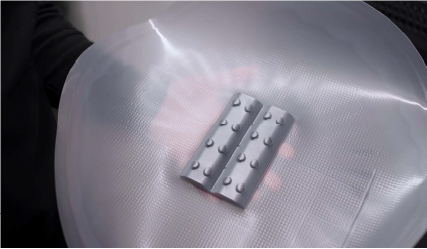
To solve the challenge, the Formlabs team used their SLA 3D printers to create accurate molds and then leveraged the Mayku Multiplier to pressure-form thermoplastic covers. The result? A functional prototype completed in just days without the need for costly outsourcing or long lead times.

Faster Prototyping With SLA Molds and Pressure Forming

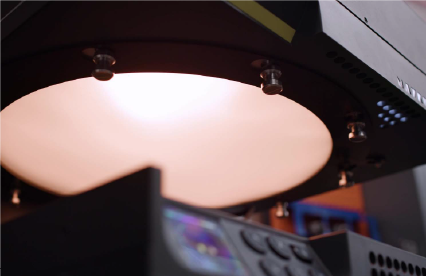
Mayku Multiplier heating up material

Mayku Multipler heating up material 

Multiplier pressure formed IR sensor covers on a Formlabs SLA 3D printed mold.

By pairing SLA-printed molds with pressure-formed parts, the Formlabs team rapidly iterated through designs, testing each version in real-world conditions. What would typically take weeks via third-party vendors was completed in-house in a fraction of the time. This hybrid approach turned a traditionally linear process into an agile, feedback-driven workflow.

“Being able to go from idea to prototype in a day or two changes how we work,” said Mechanical Engineer Jennifer Lu. “It lets us test faster, learn faster, and stay focused on building a better product.”

Real-World Results: Same-Day Prototyping With Mayku and Formlabs

The Mayku Multiplier delivered production-quality parts even on intricate geometries making it a reliable tool for daily use. Its ability to form parts quickly and in high detail helped the Formlabs team speed up testing, reduce iteration time, and boost product development velocity.

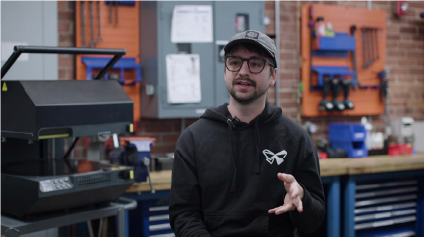
Franko Kosic-Matulic, Machine Shop Coordinator at Formlabs.

Franko Kosic-Matulic, Machine Shop Coordinator at Formlabs.

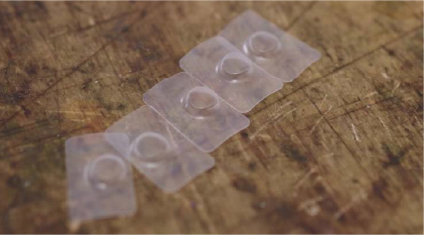
The finished  pressureformed sensor cover after postprocessing

The finished  pressureformed sensor cover after postprocessing

“We can definitely rely on the Multiplier to give us really high detail and also form quickly and produce a lot of parts,” said Machine Shop Coordinator Franko Kosic-Matulic.

What Hybrid Manufacturing Means for Engineers and Product Developers

The collaboration between Formlabs and Mayku is a compelling example of how hybrid manufacturing can elevate modern product development. By combining SLA 3D printing with pressure forming, engineers gain access to a faster, more repeatable, and cost-effective workflow ideal for prototyping, testing, and small-batch production.

Whether you’re a mechanical engineer, industrial designer, or lab manager, this approach shows how the right combination of tools can transform the way you work.

Download the Full Case Study: How Formlabs Accelerated Prototyping with the Mayku Multiplier

Get instant access to the full case study and learn how Formlabs leveraged pressure forming to cut prototyping time from weeks to days.

Marketing by
Categories
3D Printing Aerospace Education Engineering Healthcare Manufacturing

Tullomer Filament: Breakthrough Findings on Low-Outgassing for Ultra-High Vacuum Applications

Tullomer: The Ideal Low-Outgassing Filament for UHV Applications

With its remarkably low outgassing properties, Tullomer outperforms standard materials like PEEK, making it ideal for UHV applications. Extensive testing, including residual gas analysis, has proven its reliability in maintaining pristine vacuum conditions, making it a top choice for industries like aerospace and semiconductor manufacturing.

When designing components for ultra-high vacuum (UHV) applications, the choice of materials is crucial. Metals and ceramics have traditionally been favored due to their low outgassing properties, but recent advances in 3D printing are bringing plastics into the conversation. Evaluating these 3D-printed materials, particularly in terms of outgassing and residual gas analysis (RGA), is essential to ensuring they can maintain the integrity of a UHV environment.

Outgassing Challenges in UHV Applications

Outgassing refers to releasing trapped gasses from a material when exposed to vacuum conditions. 3D-printed plastics often present challenges due to the nature of polymer absorption and their manufacturing process, which can leave microscopic voids and unreacted compounds. For 3D-printed plastics to be viable for UHV applications, their outgassing properties must be minimized. Common strategies for reducing outgassing include baking components in a vacuum oven and applying specialized surface coatings.

Residual Gas Analysis and Testing Results

Residual Gas Analysis is a critical process used to evaluate the suitability of materials for UHV applications. By measuring the gases released from a material in a vacuum, RGA allows engineers to detect contaminants and the material’s overall outgassing characteristics.  In tests, Tullomer filament has shown a significantly lower emission of residual gases, making it a top choice for environments where even trace contaminants can cause issues.

Tullomer’s Superior Outgassing Performance

Tullomer filament has been scientifically proven to significantly outperform other materials in minimizing outgassing. In a recent study conducted by Lund University, Tullomer demonstrated an outgassing rate lower than industry-standard PEEK after a standard bakeout process. The results were so impressive that Tullomer reached the system detection limit post-bakeout, making it an ideal choice for engineers and researchers in UHV applications. These groundbreaking findings were presented at the SRI conference in Hamburg, where experts praised Tullomer for its unmatched outgassing performance in vacuum environments. As a result, Tullomer is now considered the top material for applications where maintaining vacuum conditions is critical.

Applications in Aerospace and Semiconductor Manufacturing

The unique formulation of Tullomer filament offers more than just low outgassing. It also provides exceptional strength and thermal stability, making it ideal for high-performance applications in both high-vacuum (HV) and UHV systems. Its low desorption rates ensure that vacuum conditions remain pristine, minimizing contamination risks while ensuring reliable operation over extended periods. Extensively tested and validated by leading experts in vacuum technology, Tullomer is engineered for precision. Whether you’re developing complex components for UHV research or deploying systems in critical environments like aerospace or semiconductor manufacturing, this filament offers unmatched performance, with proven results that set it apart from competitors like PEEK.

Why Tullomer is the Future of UHV-Compatible Filaments?

With the development of advanced filaments like Tullomer, 3D-printed plastics are set to become a reliable choice for UHV applications. While traditional polymers like PEEK and ULTEM have demonstrated solid performance, Tullomer’s revolutionary low-outgassing properties place it ahead of the curve. Its strength, thermal stability, and precision make it an indispensable material for engineers and researchers working in ultra-high vacuum environments. By minimizing outgassing and ensuring high system reliability, Tullomer elevates the standard for vacuum-compatible materials. Whether you’re prototyping or producing critical components, switching to Tullomer offers a new level of performance backed by scientific validation and industry trust.

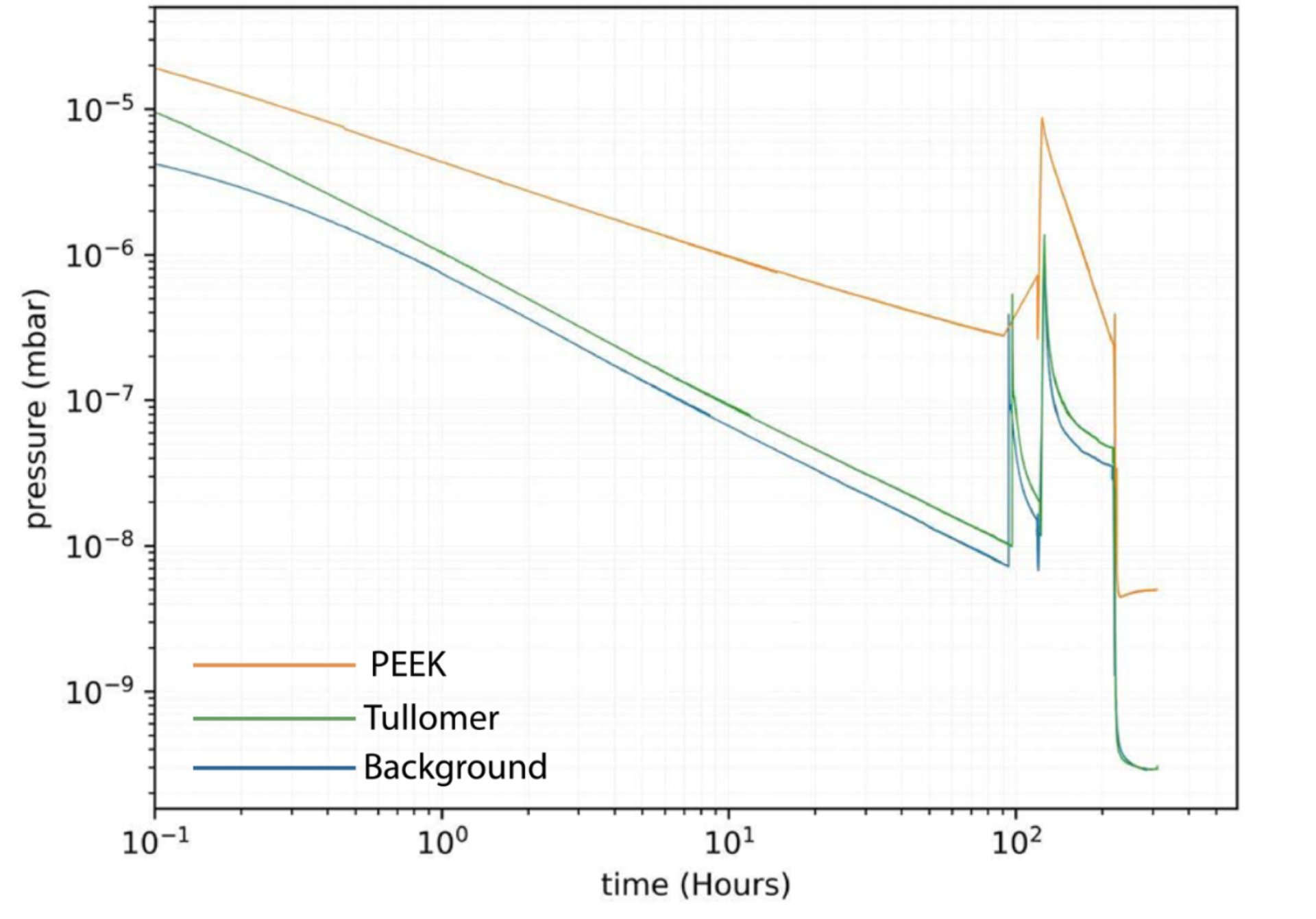
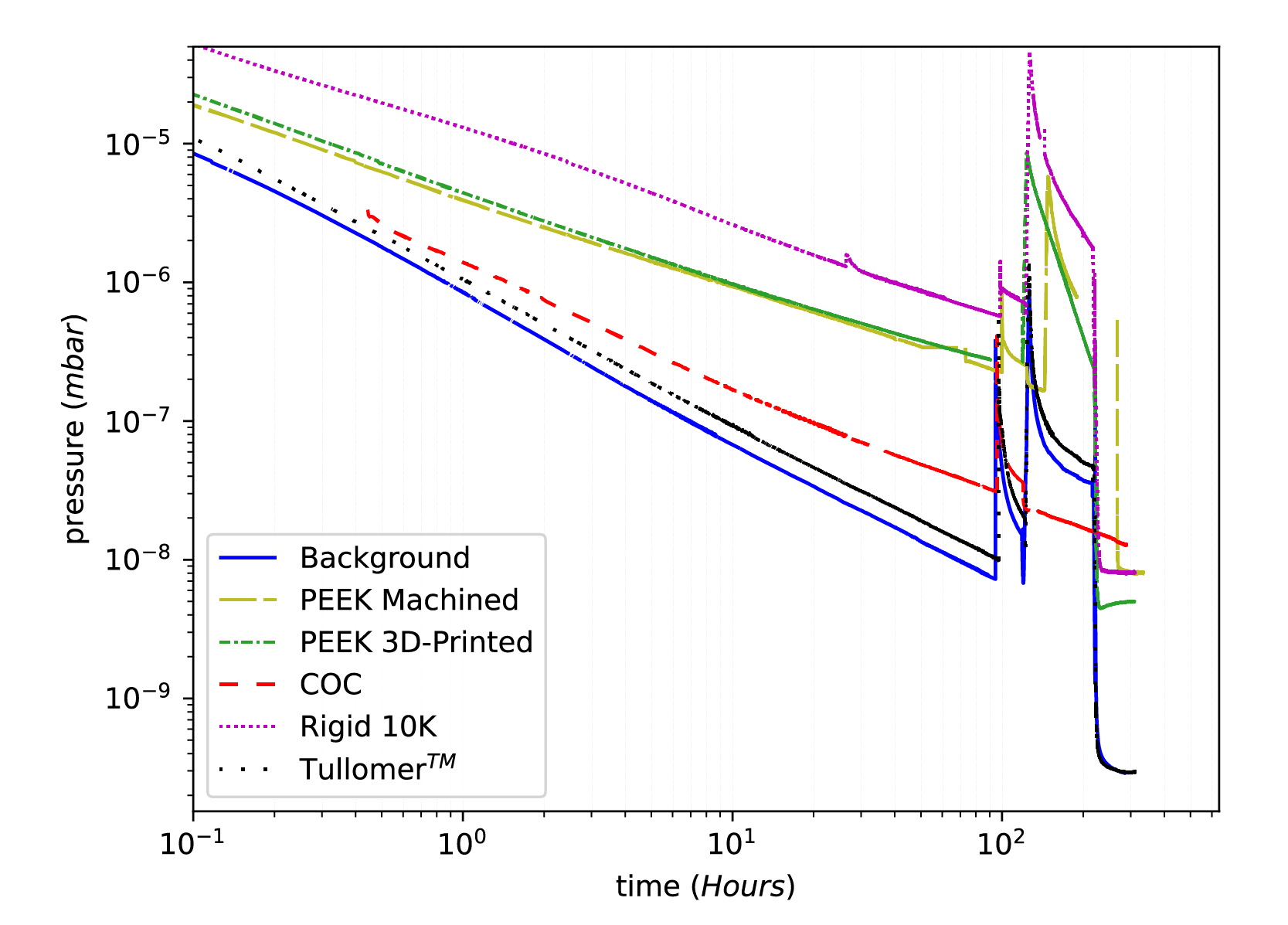
Tullomer Out Performs All Tested Samples

Tullomer performed significantly better both before and after the bakeout, even reaching the detection limit of our setup for the sample size after the bakeout.

Tullomer vs PEEK

Tullomer filament residual gas analysis results

Tullomer vs all samples

Tullomer filament residual gas analysis results

Download The Full Case Study Results

Lund University’s Study on Outgassing Performance

Evaluation of 3D-Printed Plastics for Ultra-High Vacuum applications: Outgassing, and Residual Gas Analysis

Marketing by
Tullomer Filament

Tullomer: Minimize Outgassing, Maximize Performance

Categories
3D Printing Manufacturing

Jigs and Fixtures 3D Printing Design Guide

Categories
3D Printing Manufacturing

Get started with SLS 3D Printing

Categories
3D Printing Automotive Manufacturing

Accelerate Your Production with Audi Sport’s 3D Printing Workflow