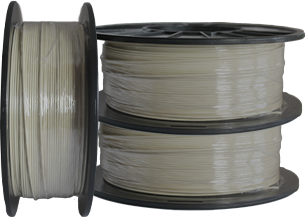


Tullomer: The Ideal Low-Outgassing Filament for UHV Applications
With its remarkably low outgassing properties, Tullomer outperforms standard materials like PEEK, making it ideal for UHV applications. Extensive testing, including residual gas analysis, has proven its reliability in maintaining pristine vacuum conditions, making it a top choice for industries like aerospace and semiconductor manufacturing.
When designing components for ultra-high vacuum (UHV) applications, the choice of materials is crucial. Metals and ceramics have traditionally been favored due to their low outgassing properties, but recent advances in 3D printing are bringing plastics into the conversation. Evaluating these 3D-printed materials, particularly in terms of outgassing and residual gas analysis (RGA), is essential to ensuring they can maintain the integrity of a UHV environment.
Outgassing Challenges in UHV Applications
Outgassing refers to releasing trapped gasses from a material when exposed to vacuum conditions. 3D-printed plastics often present challenges due to the nature of polymer absorption and their manufacturing process, which can leave microscopic voids and unreacted compounds. For 3D-printed plastics to be viable for UHV applications, their outgassing properties must be minimized. Common strategies for reducing outgassing include baking components in a vacuum oven and applying specialized surface coatings.
Residual Gas Analysis and Testing Results
Residual Gas Analysis is a critical process used to evaluate the suitability of materials for UHV applications. By measuring the gases released from a material in a vacuum, RGA allows engineers to detect contaminants and the material’s overall outgassing characteristics. In tests, Tullomer filament has shown a significantly lower emission of residual gases, making it a top choice for environments where even trace contaminants can cause issues.
Tullomer’s Superior Outgassing Performance
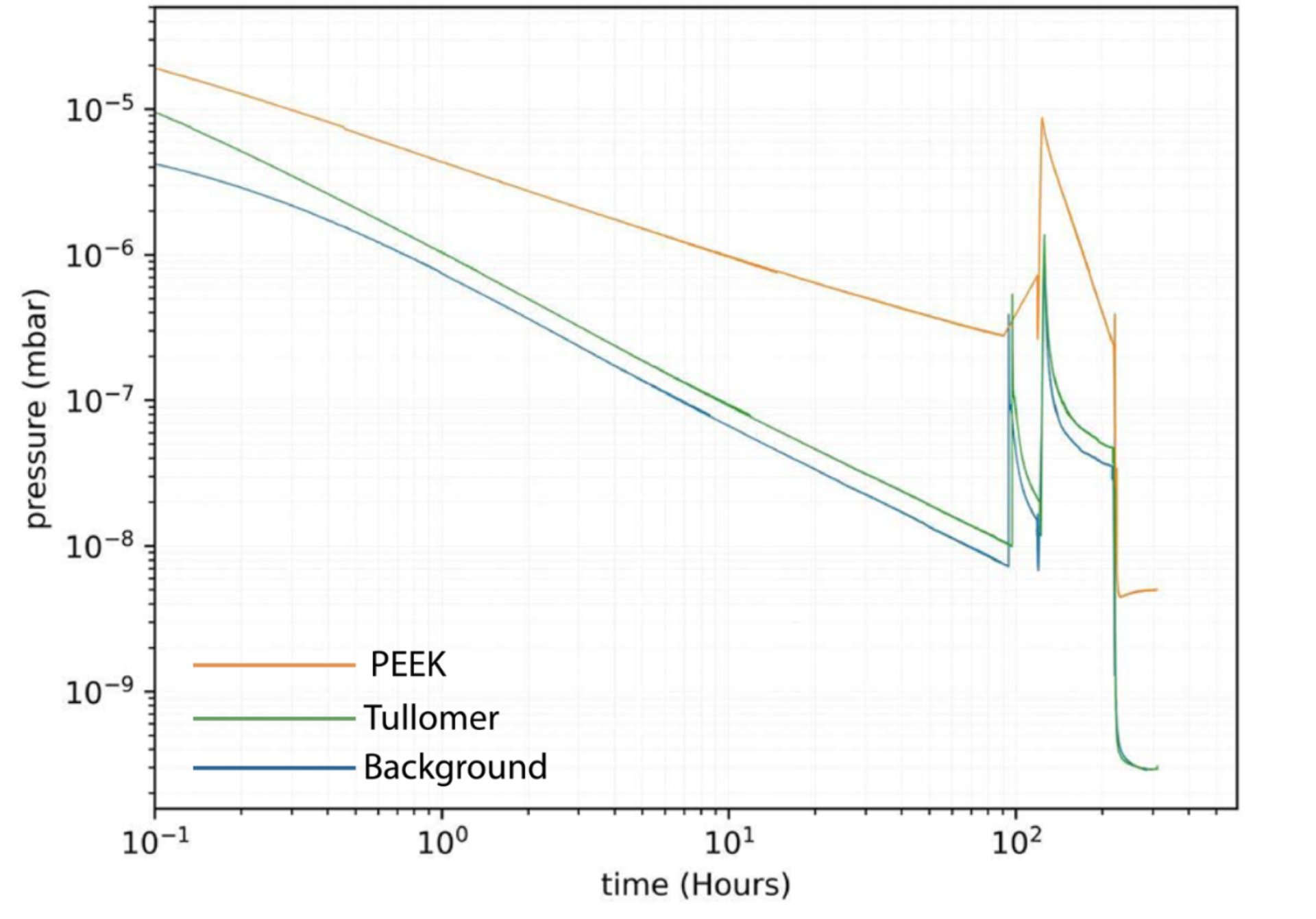
Tullomer filament has been scientifically proven to significantly outperform other materials in minimizing outgassing. In a recent study conducted by Lund University, Tullomer demonstrated an outgassing rate lower than industry-standard PEEK after a standard bakeout process. The results were so impressive that Tullomer reached the system detection limit post-bakeout, making it an ideal choice for engineers and researchers in UHV applications. These groundbreaking findings were presented at the SRI conference in Hamburg, where experts praised Tullomer for its unmatched outgassing performance in vacuum environments. As a result, Tullomer is now considered the top material for applications where maintaining vacuum conditions is critical.
Applications in Aerospace and Semiconductor Manufacturing
The unique formulation of Tullomer filament offers more than just low outgassing. It also provides exceptional strength and thermal stability, making it ideal for high-performance applications in both high-vacuum (HV) and UHV systems. Its low desorption rates ensure that vacuum conditions remain pristine, minimizing contamination risks while ensuring reliable operation over extended periods. Extensively tested and validated by leading experts in vacuum technology, Tullomer is engineered for precision. Whether you’re developing complex components for UHV research or deploying systems in critical environments like aerospace or semiconductor manufacturing, this filament offers unmatched performance, with proven results that set it apart from competitors like PEEK.
Why Tullomer is the Future of UHV-Compatible Filaments?
With the development of advanced filaments like Tullomer, 3D-printed plastics are set to become a reliable choice for UHV applications. While traditional polymers like PEEK and ULTEM have demonstrated solid performance, Tullomer’s revolutionary low-outgassing properties place it ahead of the curve. Its strength, thermal stability, and precision make it an indispensable material for engineers and researchers working in ultra-high vacuum environments. By minimizing outgassing and ensuring high system reliability, Tullomer elevates the standard for vacuum-compatible materials. Whether you’re prototyping or producing critical components, switching to Tullomer offers a new level of performance backed by scientific validation and industry trust.
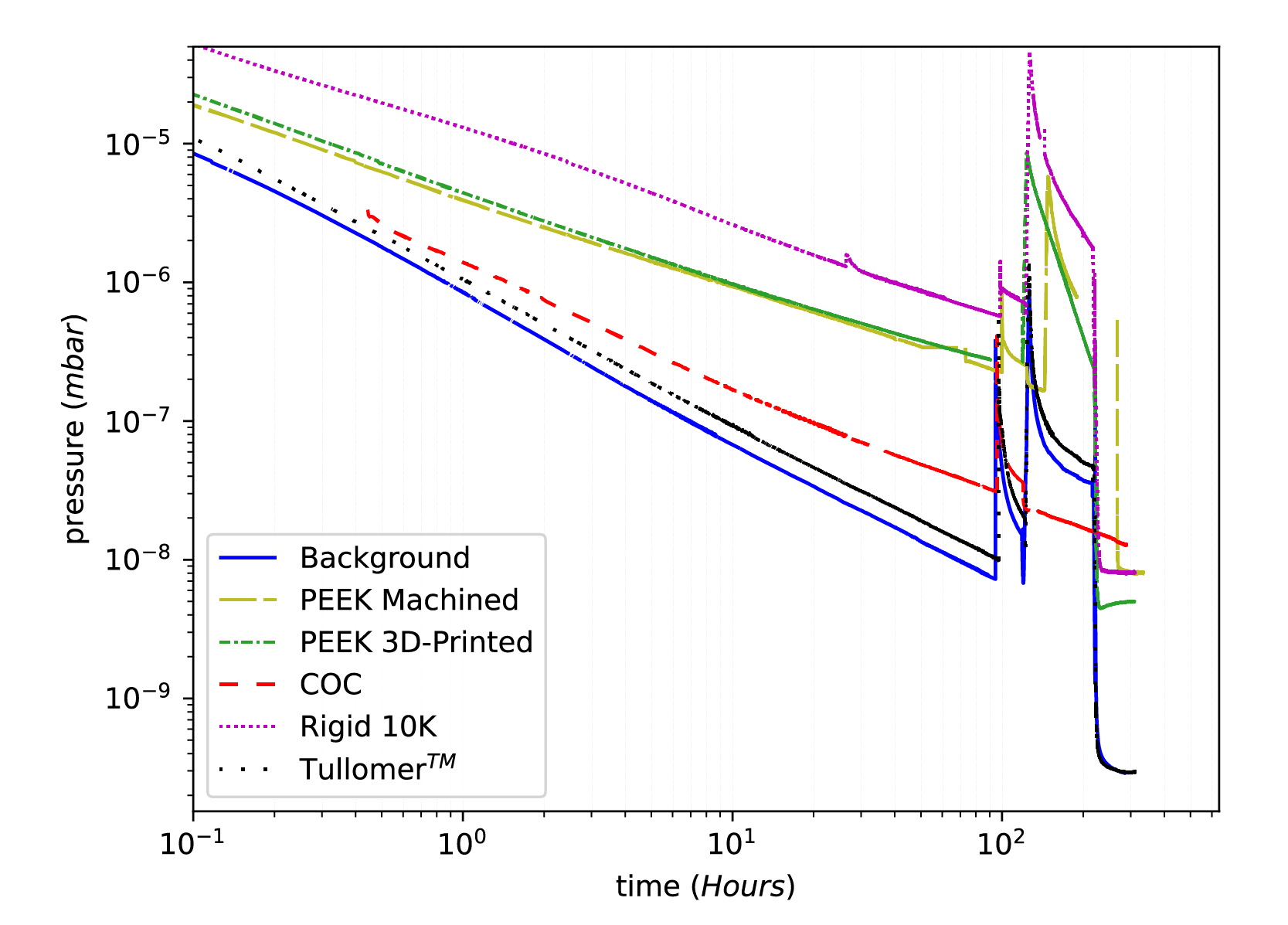
Tullomer Out Performs All Tested Samples
Tullomer performed significantly better both before and after the bakeout, even reaching the detection limit of our setup for the sample size after the bakeout.
Tullomer vs PEEK
Tullomer vs all samples
Download The Full Case Study Results